
Keys
1. Keys Dank Prison utilizes a custom Key System created specifically for Dank Prison that is unlike any other server.
1. Key Info
- You can Shift + Click to open Multiple Stacks of Keys at a time at the Key Crate.
- Keys can be obtained from many sources including Mining, Fishing, Auto Miner, OverDrive, Wheel of Fortune, Plinko, Slots, Etc.
- Key Organizer /ko will leave 1 of each Key type in your inventory, allowing you to better sort incoming keys.
- Key BackPack /kbp can be used to store keys as you mine them.
- Key Opener /keyopener can be used to open keys as you mine them.
- (Note: ++ Keys can only be found via Mining and Fishing for Knight Players with the LuckyKeys++ Custom Enchant.)
1. How to Upgrade
- You can Manually upgrade 4x key to 1x upgraded key by inputting 4x of same lesser keys into your 2x2 crafting table in your inventory.
Alternatively, you can use our Key BackPack system to bulk craft/upgrade.
1. Commands {| class="wikitable" ! Command ! Description |- |/kw || Opens the Key Rewards Menu |- |/crates || Teleports you to Key Opening Area |}
1. Upgrading Keys {| class="wikitable" |- ! Key Upgrading |- | 4x Vote Key = 4x Vote+ Keys = 1x Vote++ Keys |- | 4x Rankup Key = 4x Rankup+ Keys = 1x Rankup++ Keys |- | 4x Mine Key = 4x Mine+ Keys = 1x Mine++ Keys |- | 4x UltraMine Key = 4x UltraMine+ Keys = 1x UltraMine++ Keys |- | 4x Prestige Key = 4x Prestige+ Keys = 1x Prestige++ Keys |- | 4x Master Key = 4x Master+ Keys = 1x Master++ Keys |- | 4x Champion Key = 4x Champion+ Keys = 1x Champion++ Keys |- | 4x Knight Key = 4x Knight+ Keys = 1x Knight++ Keys |- | 4x Royal Key = 4x Royal+ Keys = 1x Royal++ Keys |}
1. Possible Key Rewards Below is the possible key rewards. Note that you only get one of the below rewards. For some that can either be various amounts of tokens or key(s), but you still only get one item from a key. {| class="wikitable" |- ! colspan="2" | Basic Keys |- ! Key !! Possible Rewards |- | Vote Key || 150, 250, 750, or 1,000 Tokens, or an UltraMine Key |- | Rankup Key || 150, 250, 750, or 1,000 Tokens, or an UltraMine Key |- | Mine Key || 200, 350, 750, 1,000, 1,500, or 2,500 Tokens, or an UltraMine+ Key |- | UltraMine Key || 500, 1,500, 2,500, 3,500, 7,500, 10,000, or 15,000 Tokens |- | Prestige Key || 500, 1,000, 2,000, 3,500, 10,000, or 15,000 Tokens or 3x UltraMine Keys |- | Master Key || 100,000, 200,000, 400,000, 600,000, 800,000, or 1,000,000 Tokens |- | Champion Key || 1,000,000, 2,000,000, 4,000,000, 6,000,000, 8,000,000, or 10,000,000 Tokens |- | Knight Key || 10,000,000, 20,000,000, 40,000,000, 60,000,000, 80,000,000, or 100,000,000 Tokens |- {| class="wikitable" |- ! colspan="2" | Plus Keys (e.g, Master+) |- ! Key !! Possible Rewards |- | Vote+ Key || 600, 1,000, 3,000, or 4,000 Tokens or an UltraMine+ Key |- | Rankup+ Key || 600, 1,000, 3,000, or 4,000 Tokens or an UltraMine+ Key |- | Mine+ Key || 800, 1,400, 3,000, 4,000, 6,000, or 10,000 Tokens or an UltraMine+ Key |- | UltraMine+ Key || 2,000, 6,000, 10,000, 15,000, 30,000, 40,000, or 60,000 Tokens |- | Prestige+ Key || 2,000, 4,000, 8,000, 15,000, 40,000, or 60,000 Tokens or 3x UltraMine Keys |- | Master+ Key || 200,000, 400,000, 800,000, 1,600,000, 3,200,000, or 6,400,000 Tokens |- | Champion+ Key || 2,000,000, 4,000,000, 8,000,000, 16,000,000, 32,000,000, or 64,000,000 Tokens |- | Knight+ Key || 20,000,000, 40,000,000, 80,000,000, 160,000,000, 320,000,000, or640,000,000 Tokens |- | Royal+ Key || 200,000,000, 400,000,000, 800,000,000, 1,600,000,000, 3,200,000,000, or 6,400,000,000 Tokens |} {| class="wikitable" |- ! colspan="2" | Plus Plus Keys (e.g, Master++) |- ! Key !! Possible Rewards |- | Vote++ Key || 3,000, 4,000, 7,000, or 10,000 Tokens or an UltraMine++ Key |- | Rankup++ Key || 3,000, 4,000, 7,000, or 10,000 Tokens or an UltraMine++ Key |- | Mine++ Key || 4,000, 6,000, 10,000, 15,000, or 20,000 Tokens or an UltraMine++ Key |- | UltraMine++ Key || 15,000, 30,000, 40,000, 60,000, 90,000, or 120,000 Tokens |- | Prestige++ Key || 15,000, 40,000, 60,000, 90,000, or 120,000 Tokens or 3x UltraMine++ Keys |- | Master++ Key || 3,200,000, 6,400,000, 9,600,000, or 12,800,000 Tokens |- | Champion++ Key || 32,000,000, 64,000,000, 96,000,000, or 128,000,000 Tokens |- | Knight++ Key || 320,000,000, 640,000,000, 960,000,000, or 1,280,000,000 Tokens |- | Royal++ Key || 3,200,000,000, 6,400,000,000, 9,600,000,000, or 12,800,000,000 Tokens |}
1. Key BackPack 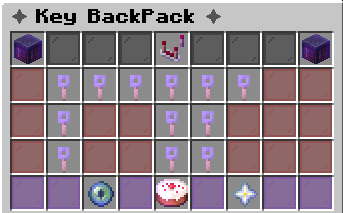 1. Key BackPack Info
- Key BackPack has the ability to store an Infinite amount of keys.
- Key BackPack holds all Key Types.
- KBP has a unique feature of pulling Keys from KBP if you Shift + click the Key Crate with an empty hand. (Key Pulling Prioritizes Keys in order from non to ++.)
- KBP Only Deposits Keys selected in your /kbpsettings when Enabled.
- KBP has a unique Feature to act as a Key OverFlow to prevent key loss when Inventory has become Full.
- KBP has the ability to upgrade all Keys in KBP to the next Tier using the upgrade button in the corner of the menu.
- KBP has the ability to Open all keys using the Open button in the bottom of the menu.
- As of January 2026, KBP now has two new buttons:
- Open Under-Master - Opens all Keys below Master. - Open ++ Keys - opens all ++ Tier Keys.
1. Commands {| class="wikitable" ! Command ! Aliases ! Description |- |/keybackpack || /kbp || Opens your Key BackPack |- |/kbpsettings || /s kbp || Opens Key BackPack Settings Menu |}
1. Key Opener 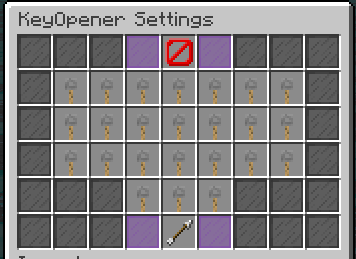 1. Key Opener Info
- Key Opener can be toggled on and off using commands below.
- You can select which keys are automatically opened with the Key Opener.
- Key BackPack triggers before the Key Opener, so if you have the Key BackPack Enabled the Key Opener will only open keys which you do not have set to deposit into your Key BackPack.
1. Commands {| class="wikitable" ! Command ! Description |- |/keyopener || Opens Key Opener Settings Menu |}
1. How to Unlock
- UltraDank Donator Rank or higher includes Key Opener.
1. Key Organizer 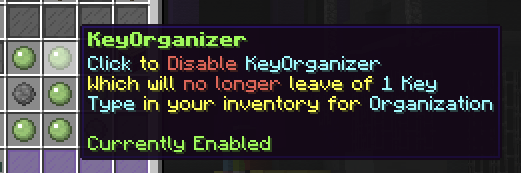
1. Key Organizer Info
- Key Organizer can be toggled on and off using the commands below.
- Key Organizer leaves 1 of each Key Type in your Inventory while upgrading to allow you to Organize Keys into your Inventory.
1. Commands {| class="wikitable" ! Command ! Aliases ! Description |- |/keyorganizer || /ko || Toggles on / off Key Organizer |}